Free & Open Source • 100% Local • No Cloud

Know Exactly
Where Your Time Goes

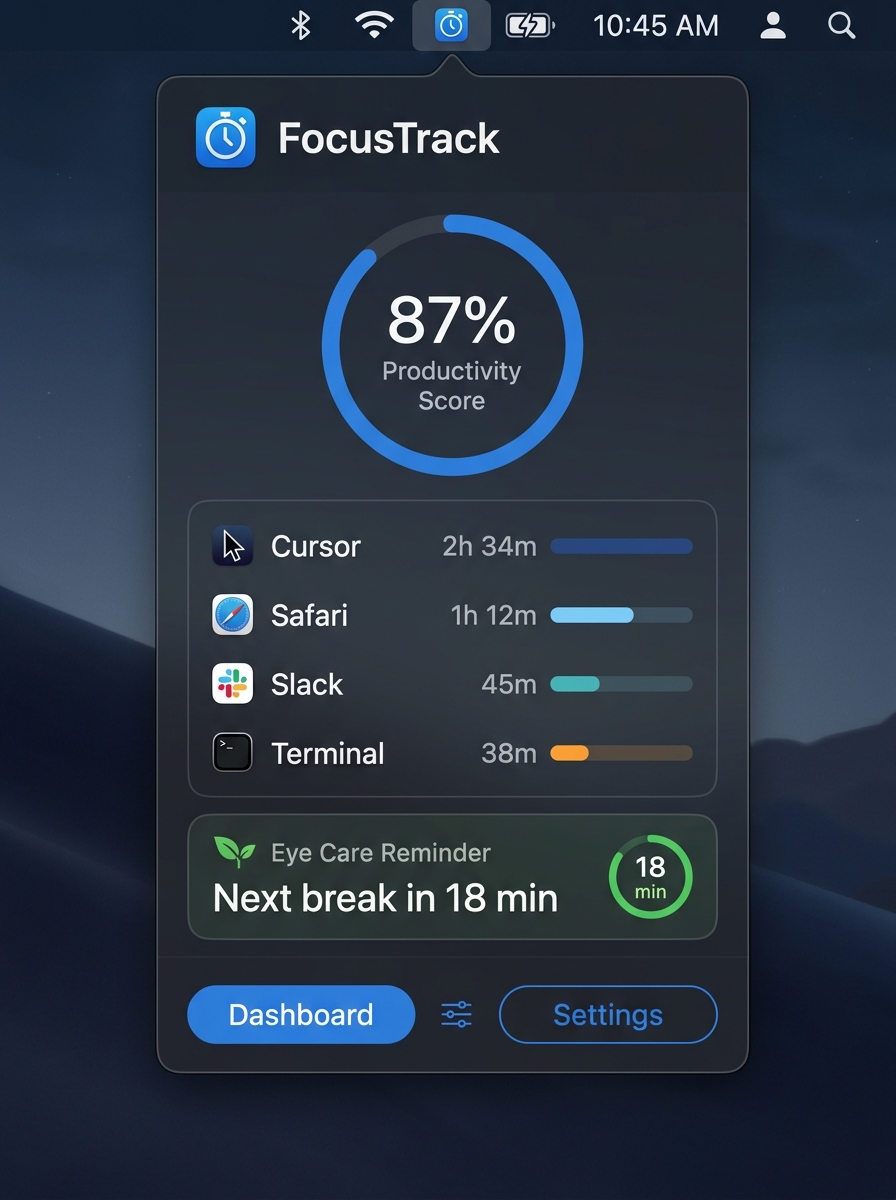
FocusTrack silently lives in your menu bar, tracking every minute you spend in each app — and reminding you to protect your eyes. No subscriptions, no telemetry.

⬇  Free Download  ·  macOS View on GitHub
Universal Binary (Apple Silicon & Intel) macOS 13+ ~3 MB Zero Telemetry
FocusTrack macOS menu bar app showing productivity score, app usage breakdown, and eye care timer

Everything you need

Productivity without the bloat

Every feature is native, fast, and built for macOS. No Electron, no servers, no nonsense.

🍃

Eye Care & Break Reminders

Built-in 20-20-20 rule reminders that gently overlay your screen — never interrupting your focus, just protecting your vision over the long haul.

Eye Care
😴

Smart Idle Detection

Stepped away from your keyboard? FocusTrack automatically pauses tracking after a configurable idle threshold so your data stays honest.

📤

Data Export

Export your entire history as CSV or JSON with one click. Your data, your format — import it into Excel, Notion, or any tool you love.

Native & Ultra-Lightweight

Written in pure Swift with SwiftUI. No frameworks, no runtime bloat. FocusTrack uses less than 15 MB of RAM while running all day in the background.

🔄

Launch at Login

Enable launch-at-login with one toggle using the modern ServiceManagement API. Starts silently with your Mac — no background agents or daemons.
Protect your vision,
every 20 minutes

The 20-20-20 rule: every 20 minutes, look at something 20 feet away for 20 seconds. FocusTrack makes sure you never forget — with a gentle, non-intrusive banner.

Customizable Interval
Set your own break interval from 5 to 60 minutes
🖥️
Overlay Banner
A subtle full-screen banner — not a jarring popup
⏸️
Idle-Aware
Timer pauses automatically when you step away

🍃 Eye Care Status

18m

Next Break in 18 min

You're doing great! Keep it up.

7
Breaks Today
2.4h
Screen Time
98%
Eye Health
Interval
20 minutes
🔒

Your data never leaves your Mac

FocusTrack stores everything in a local SQLite database. There are no accounts, no analytics, no background servers — ever. Delete the app, delete the data. Simple.

✅ Zero Telemetry
✅ Local SQLite Only
✅ No Account Required
✅ Open Source
✅ Sandboxed App

Got questions?

FAQ

No special permissions are required for basic time tracking. FocusTrack uses standard macOS APIs to detect the frontmost application. The app runs with the minimum required entitlements under Hardened Runtime.
All data is stored in a SQLite database inside your Mac's Application Support folder. Nothing is ever sent to external servers. You can export everything as CSV/JSON at any time from the Settings panel.
FocusTrack is designed to be ultra-lightweight. Typical CPU usage is less than 0.1% and RAM stays under 15 MB, making it one of the most battery-friendly productivity tools available.
Yes, completely free and open source under the MIT license. No freemium, no paywalls, no ads. The full source code is available on GitHub — you can even build it yourself.
FocusTrack requires macOS 13 Ventura or later. It runs natively on both Apple Silicon (M1/M2/M3/M4) and Intel Macs as a Universal Binary.

Ready to own your time?

Free, open source, and it takes 10 seconds to install.

⬇  Download FocusTrack View Source

Universal Binary · macOS 13+ · ~3 MB · Notarized